Uploading Large Files Without Crashing Your Server: A Complete Guide to AWS S3 Multipart Uploads
How to build a scalable, resumable, and reliable file upload system by streaming file chunks directly from the browser to Amazon S3.

If you've ever tried uploading a 5GB file through a traditional web server, you know the dread. The browser hangs at 98%, the connection drops for a microsecond, and "boom" the entire upload fails. Your user is frustrated, your server memory is crying, and you're stuck looking at a 504 Gateway Timeout.
There is a better way to handle massive files. Instead of forcing your application server to act as a middleman, choking its RAM and CPU, you can let your frontend stream chunks directly to Amazon S3.
In this guide, we'll walk through AWS S3 Multipart Uploads: what they are, why they matter, and how to build a robust architecture that can handle multi-gigabyte uploads without crashing your infrastructure.
The Problem with Traditional File Uploads
When building web applications, the naive approach to file uploads looks something like this:
[ Frontend / Browser ] ──( Massive File )──> [ Your Backend Server ] ──> [ Cloud Storage ]
This model breaks down quickly for three reasons:
Memory Exhaustion: Buffering large files in server memory (or temp files) eats up system resources fast. If ten users upload large files at once, your server will likely run out of memory.
Brittle Connections: If a 2GB file fails at 1.9GB due to a momentary network drop, the user has to restart from 0%.
Server Timeouts: Reverse proxies like Nginx or cloud gateway load balancers usually have strict timeout limits (e.g., 60 seconds). A large file on a slower internet connection will time out every single time.
What is an S3 Multipart Upload?
An S3 Multipart Upload allows you to break a single large object into smaller chunks (parts) and upload them independently to AWS S3.
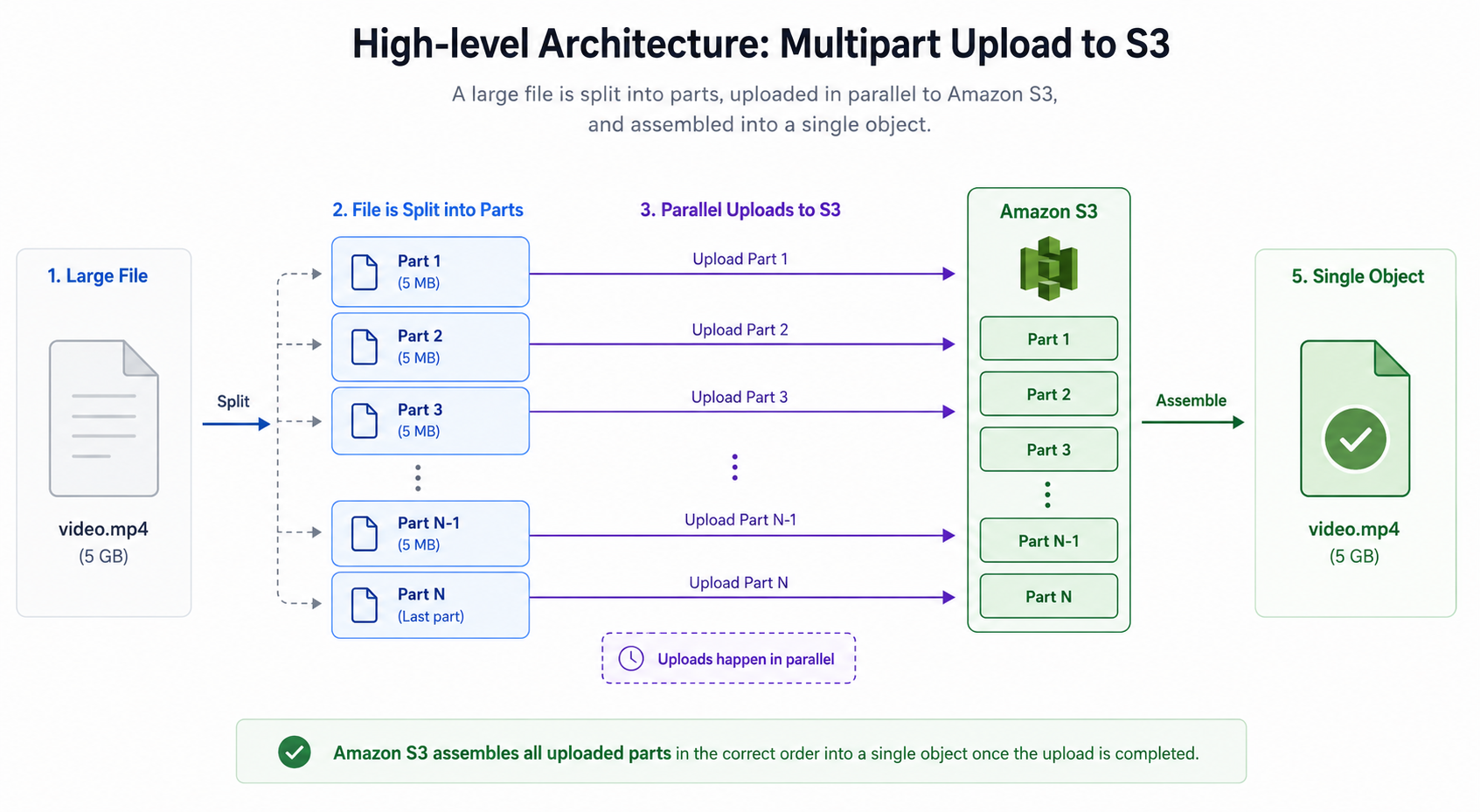
Here is why this pattern is so effective:
Direct-to-S3: The heavy binary data flows directly from the user's browser to S3. Your backend server only exchanges tiny JSON metadata payloads (like generating authorization keys).
Parallel Chunks: You can upload multiple chunks simultaneously, drastically improving speeds.
Resilience: If Part 4 fails due to a network blip, you only retry Part 4, not Parts 1 through 3.
Pause and Resume: Because uploaded parts persist in S3 under an upload ID, users can pause an upload and resume it later.
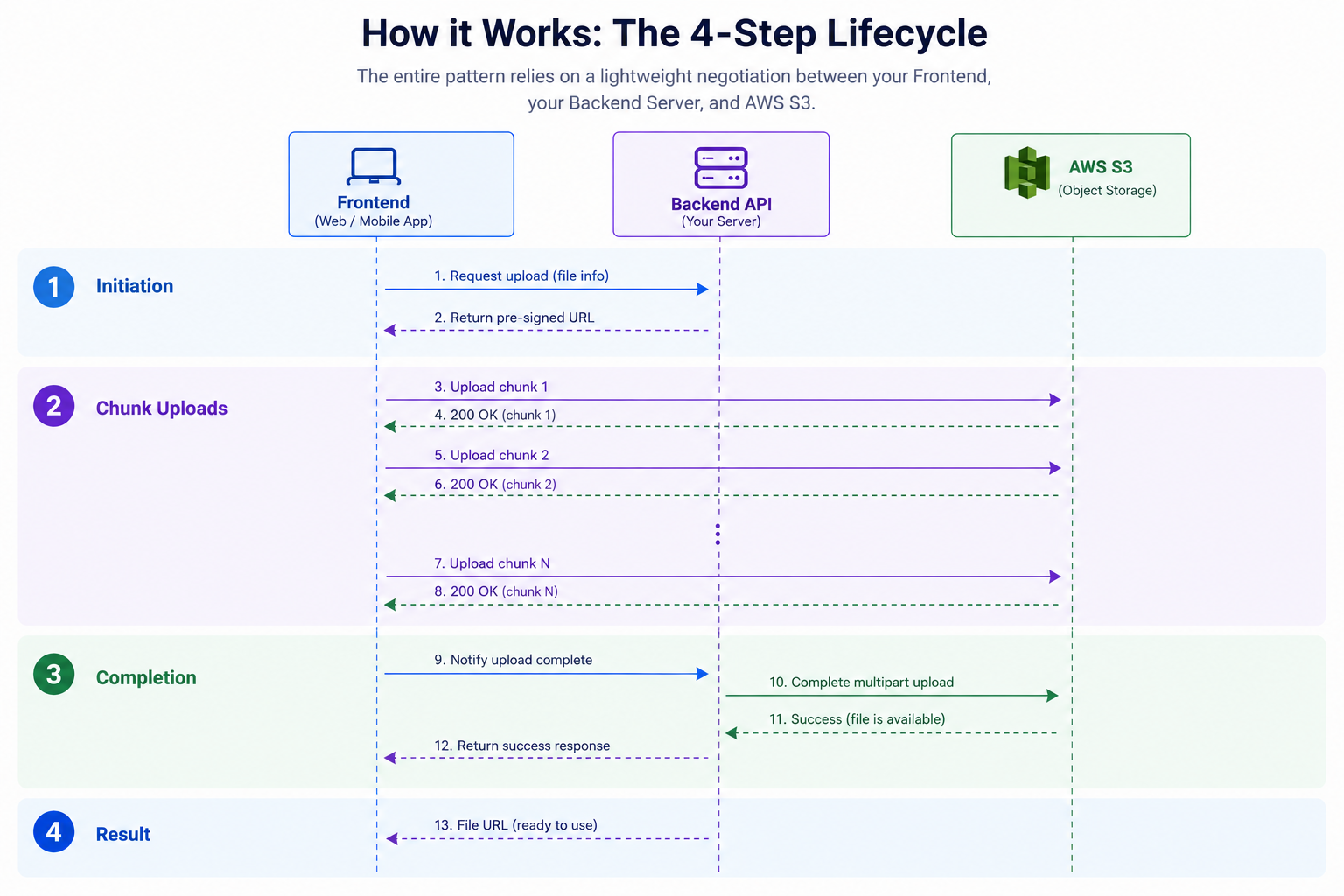
How it Works: The 4-Step Lifecycle
The entire pattern relies on a lightweight negotiation between your Frontend, your Backend Server, and AWS S3.
Step 1: Initiate the Upload Session
Before sending any file bytes, the frontend asks your backend server to start an upload session. Your backend calls AWS S3's CreateMultipartUpload API, which creates a temporary upload session and returns a unique UploadId.
Your backend saves this session details (file name, file size, upload ID) in your database and returns the UploadId to the frontend.
Step 2: Request Pre-Signed Part URLs
AWS S3 is secure by default, so the frontend cannot simply upload data to your bucket without authorization. To bypass having your backend handle the data, the backend generates Pre-Signed URLs for specific chunks.
For each chunk (e.g., Part 1, Part 2, Part 3), the frontend asks the backend for a URL. The backend generates an expiring, cryptographically signed S3 URL specifically for that PartNumber and UploadId.
Step 3: Stream Chunks Directly to S3
Equipped with a pre-signed URL, the frontend makes an HTTP PUT request containing the chunk's binary data directly to AWS S3.
When S3 accepts a chunk, it returns a header called an ETag (an MD5 checksum of that chunk). The frontend records these PartNumber and ETag pairs, they are the receipts proving the chunk was received.
Step 4: Complete the Upload
Once all chunks are sent, the frontend sends a list of all PartNumber and ETag pairs back to your backend. Your backend then makes a final call to S3: CompleteMultipartUpload.
S3 verifies all pieces, stitches them back together into a single, seamless object in your bucket, and cleans up the temporary storage.
Important Rules to Keep in Mind
If you are setting this up for the first time, keep these key rules in mind to avoid common pitfalls:
The 5MB Minimum Part Size: S3 requires every part (except the very last one) to be at least 5MB. If you try to upload a 2MB chunk as Part 1 in a multi-part sequence, S3 will reject the completion request. (Standard chunk sizes usually range between 5MB and 10MB).
Part Numbers Start at 1:
PartNumberparameter indices are 1-based, not 0-based. SendingPartNumber: 0will result in an AWS API error.CORS Configuration: Because the browser is sending
PUTrequests directly to an AWS domain, you must configure Cross-Origin Resource Sharing (CORS) on your S3 bucket.
Here is a standard, battle-tested CORS JSON rule for your S3 bucket settings:
[
  {
    "AllowedHeaders": ["*"],
    "AllowedMethods": ["GET", "PUT", "POST", "HEAD"],
    "AllowedOrigins": ["http://localhost:3000", "https://yourdomain.com"],
    "ExposeHeaders": ["ETag"]
  }
]
(Note: Exposing the ETag header is critical so your JavaScript frontend can read the S3 response headers after uploading each chunk!)
Summary
By shifting from traditional file uploads to direct S3 multipart uploads, you protect your application servers from memory exhaustion and timeout errors while delivering a much faster, crash-resistant upload experience to your users.
Whether you're building a healthcare platform ingesting DICOM scans, a video sharing app, or a simple document vault, mastering direct-to-cloud multipart uploads is one of the most useful performance upgrades you can give your architecture.

